TickTick alternative
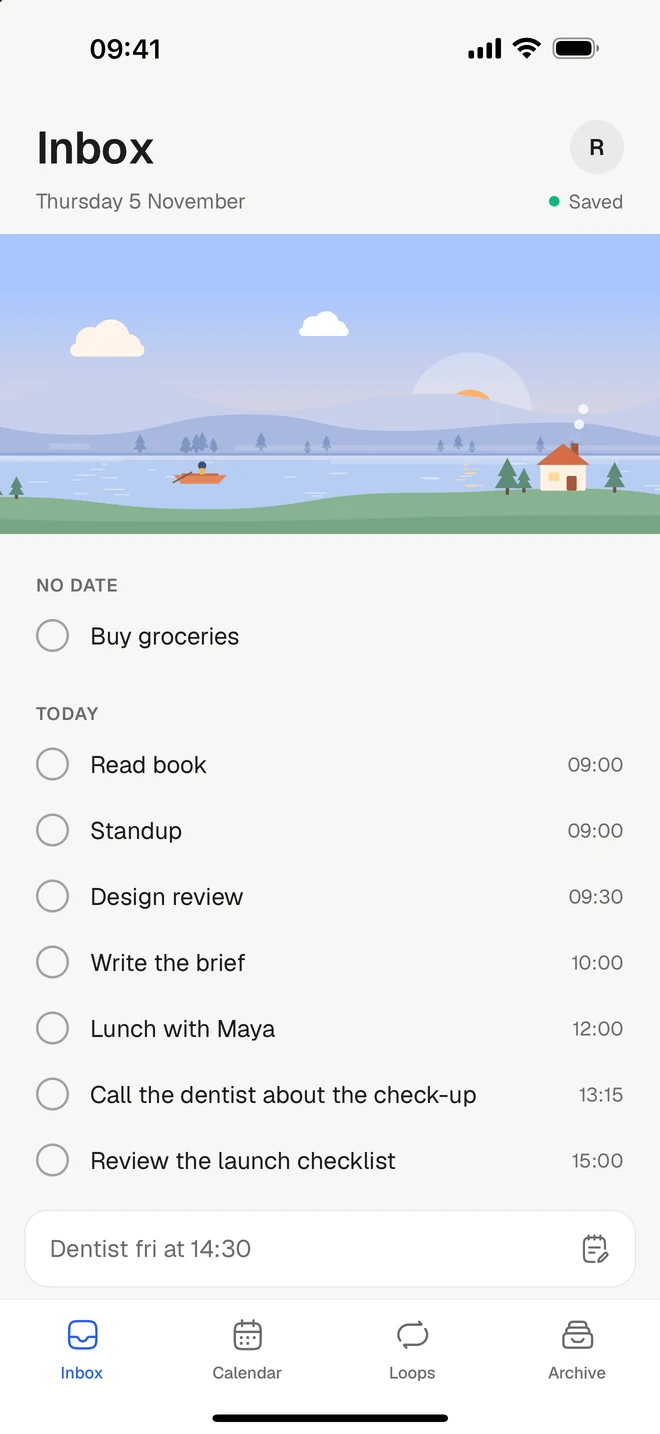
TickTick packs tasks, habits, a Pomodoro timer and 6 calendar views into a single app. Tickleaf keeps the few you’ll use every day, and keeps them quiet. On iPhone, Android, Mac and the web.
Free to start. Checked against TickTick’s own pages on Monday 9 November 2026.
The short version
Stay with TickTick if
- You want a habit tracker with check-in stats and a yearly heat map
- You plan in Kanban, Timeline or the Eisenhower Matrix
- You share lists with others, or use Windows, Linux or a watch
Try Tickleaf if
- You’d like fewer views and settings, and a list that stays quiet
- You want repeating things without charts to keep an eye on
- You want routines that walk you through steps, one at a time
Side by side
TickTick’s column comes from their own website, checked on Monday 9 November 2026. If something has changed, write to hello@ketryon.com and we’ll fix it.
| Feature | Tickleaf | TickTick |
|---|---|---|
| Platforms | TickleafiPhone, Android, Mac and the web | TickTickiPhone, iPad, Android, Mac, Windows, Linux, the web and watches |
| Price | TickleafFree. Plus is 39 kr a month or 299 kr a year, with 14 days to try it | TickTickFree, with limits like 9 lists. Premium is US$49.99 a year |
| Type it the way you’d say it | TickleafYes. “Dentist fri at 14:30” gets its day and time | TickTickYes. Smart Date Parsing, like “Meeting at 9 tomorrow” |
| A calendar beside your tasks | TickleafYes. Your Google Calendar alongside, with Plus | TickTickYes. Google, Outlook and iCloud, with 6 calendar views |
| Reminders | TickleafYes, on the web and Mac. On your phone with Plus | TickTickYes, task reminders on the free plan. Premium adds email reminders |
| Things you repeat | TickleafYes. Loops, with no streaks to break | TickTickYes. Recurring tasks, and a separate habit tracker |
| Routines, one step at a time | TickleafYes | TickTickNot mentioned on their pages |
| A timer on the lock screen | TickleafYes, on iPhone and Android | TickTickYes. Pomodoro and stopwatch, with a Live Activity |
| Home and lock-screen widgets | TickleafYes | TickTickYes, home and lock screen |
| Projects, priorities and labels | TickleafNo, on purpose | TickTickYes. Lists, folders, tags, priorities and smart filters |
| Shared lists | TickleafNo | TickTickYes. Shared lists, assignees and comments |
Sources: TickTick Premium, Downloads, Features, Habits, Focus, Backup & Import. Checked Monday 9 November 2026.
What’s different
Less to choose
Fewer places to look.
TickTick offers lists, Kanban, Timeline, a matrix and 6 calendar views. Tickleaf has an Inbox, a calendar, your loops and an archive, and that’s the whole map.
No streaks
A day off is just a day off.
TickTick’s habits come with check-ins, charts and a heat map. Tickleaf’s loops fill in your week as you go, and carry on when you skip a day.
Routines
One step at a time.
Give a loop steps, each with its own minutes, and press Play. Tickleaf walks you through them on the lock screen. Nothing moves on by itself.
Moving over
There’s no big move to plan. Most people start like this.
- 1Make a backup in TickTickOn the web, open Settings, then Account, then Backup & Import, and choose Generate backups. Keep it as a record, then write today’s tasks into Tickleaf. TickTick’s guide.
- 2Bring what you repeatAdd the things that come back as loops: every day, every other Tuesday, the 1st.
- 3Let the rest waitAnything without a day waits in your Inbox until you give it one.
Questions
- Can I bring my TickTick tasks into Tickleaf?
- Not automatically. TickTick can make a backup of your tasks on the web, which is good to keep. Then start with today in Tickleaf, and add the things you repeat as loops.
- Is Tickleaf free?
- Yes. Every view, quick add and loops are free on every device. Plus is 39 kr a month or 299 kr a year, with 14 days to try it.
- Does Tickleaf have a focus timer?
- Yes. Start a timer on any task, or play a routine step by step. It shows on the lock screen on iPhone and Android, and in the Dynamic Island on iPhone, with a sound to work to if you like.
- Is there a Windows app?
- No. On Windows you use Tickleaf in your browser, with the same tasks as on your phone and your Mac.
Last checked Monday 9 November 2026. TickTick is a trademark of its owner. This page is ours, not theirs.