Things 3 alternative
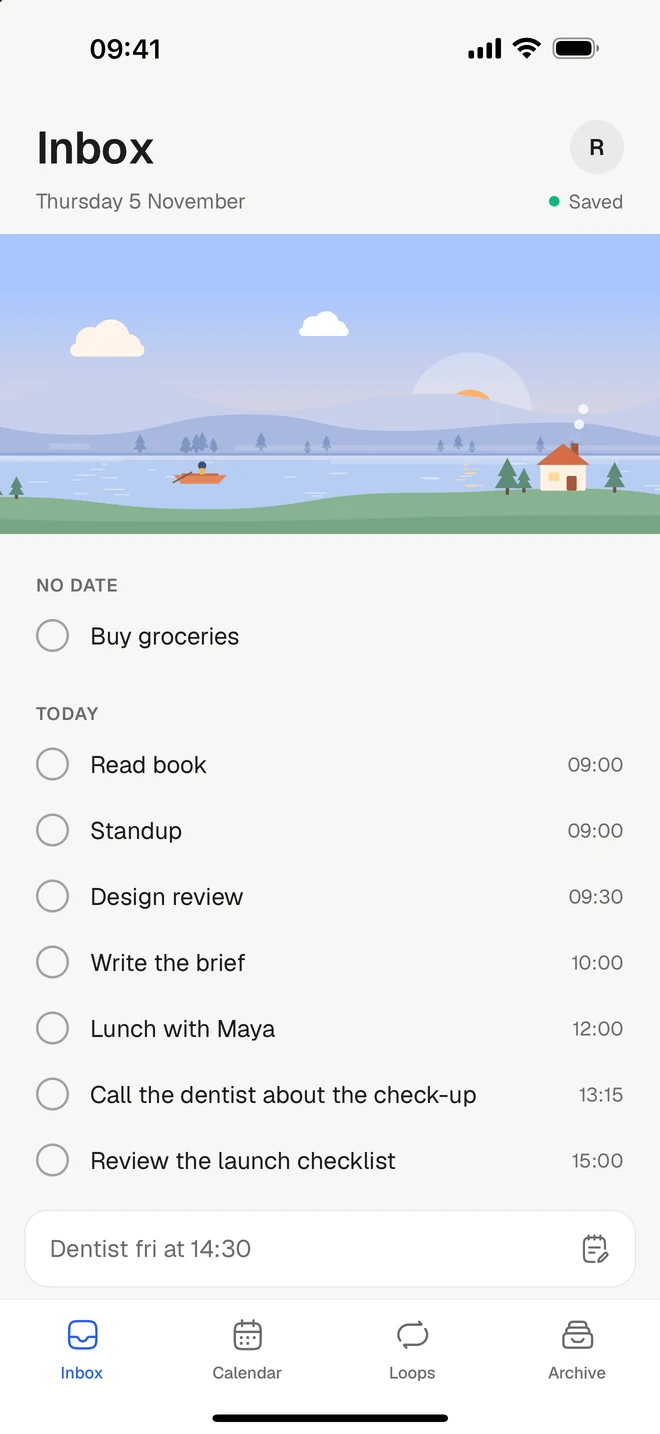
Things 3 is a beautifully calm task app, made for Apple devices only. Tickleaf brings a calm list to Android, Windows and the web, as well as iPhone and Mac.
Free to start. Checked against Things 3’s own pages on Monday 9 November 2026.
The short version
Stay with Things 3 if
- Everyone you plan with uses Apple devices, and that won’t change
- You like paying once, with no subscription
- You plan with areas, headings, This Evening and Someday
Try Tickleaf if
- You have an Android phone, or use Windows at work
- You want your tasks in any browser, wherever you are
- You’d like a timer, routines and loops for the things you repeat
Side by side
Things 3’s column comes from their own website, checked on Monday 9 November 2026. If something has changed, write to hello@ketryon.com and we’ll fix it.
| Feature | Tickleaf | Things 3 |
|---|---|---|
| Platforms | TickleafiPhone, Android, Mac and the web | Things 3iPhone, iPad, Mac, Apple Watch and Vision Pro. No Android, Windows or web |
| Price | TickleafFree. Plus is 39 kr a month or 299 kr a year, with 14 days to try it | Things 3One-time purchases: US$9.99 for iPhone, US$19.99 for iPad, US$49.99 for Mac. Sync is free |
| Type it the way you’d say it | TickleafYes. “Dentist fri at 14:30” gets its day and time | Things 3Yes, in the date pickers: “tod”, “3rd wed jul” |
| A calendar beside your tasks | TickleafYes. Your Google Calendar alongside, with Plus | Things 3Yes. Apple Calendar events in Today and Upcoming |
| Reminders | TickleafYes, on the web and Mac. On your phone with Plus | Things 3Yes. Set a time and Things reminds you |
| Things you repeat | TickleafYes. Loops, with no streaks to break | Things 3Yes, repeating to-dos and projects |
| Routines, one step at a time | TickleafYes | Things 3Not mentioned on their pages |
| A timer on the lock screen | TickleafYes, on iPhone and Android | Things 3Not mentioned on their pages |
| Home and lock-screen widgets | TickleafYes | Things 3Yes, home and lock screen |
| Projects, priorities and labels | TickleafNo, on purpose | Things 3Areas, projects, headings, tags and checklists |
| Shared lists | TickleafNo | Things 3No. Things doesn’t share lists |
Sources: Things, Where Things runs, Dates, Calendar events, Sharing, App Store. Checked Monday 9 November 2026.
What’s different
Everywhere
On the phone you already have.
Tickleaf runs on iPhone and Android, on the Mac with a menu bar app, and in any browser, so Windows works too. Your tasks are the same on all of them.
Write it down
The whole thing, in a single line.
Type “Dentist fri at 14:30” and the day and time light up as you type, straight from the title. No date picker to open.
Loops
Things that come back, gently.
What you repeat lives as a loop, with a week that fills in as you go. Skip a day and the week carries on.
Moving over
There’s no big move to plan. Most people start like this.
- 1Write down todayThings’ support pages don’t describe an export, so keep Things open beside you and write today’s tasks into Tickleaf. Nothing else has to move today.
- 2Bring what you repeatAdd the things that come back as loops: every day, every other Tuesday, the 1st.
- 3Let the rest waitAnything without a day waits in your Inbox until you give it one.
Questions
- Is there a Things 3 for Android?
- No. Cultured Code’s support pages say Things doesn’t run on Windows, Android, Linux or in a browser. Tickleaf runs on all of them except Linux, as well as iPhone and Mac.
- Is Tickleaf a subscription?
- The free plan has every view, quick add and loops, with no time limit. Plus is a subscription, at 39 kr a month or 299 kr a year.
- Does Tickleaf show my calendar?
- Yes, with Plus: your Google Calendar beside your tasks. Things shows Apple Calendar events in Today and Upcoming.
- Does Tickleaf have a Mac app?
- Yes. There’s a Mac app, and a menu bar that shows what’s left today, a click away.
Last checked Monday 9 November 2026. Things 3 is a trademark of its owner. This page is ours, not theirs.